


What is the Difference between a Vector or Raster File? A Clear Guide for 2026

Last week, a sports team coach in Hanford sent over a logo for a new printed team banner, only to realize it looked like a blurry mosaic when scaled up because it wasn't a vector file. It's a frustrating situation that happens more often than you'd think. You're probably asking, what is a vector file? We agree that file extensions like .AI and .PNG feel like a foreign language when you're just trying to get your team jerseys or vehicle decals finished.
In this guide, we'll show you how to choose the right format so your next project in Kings County stays sharp and avoids expensive delays. With 75% of people now using AI-integrated tools as of March 2026 for graphics, understanding these basics is more important than ever. We'll cover why the 300 DPI standard matters for your vinyl banners and how to identify unusable files before they hit the press.
Key Takeaways
Learn why the "stretching the rubber band" effect ruins your photos and how to keep your brand looking sharp on everything from business cards to vinyl banners.
Discover exactly what is the difference between a Vector and a Raster file so you can stop guessing which attachment to send to your printer.
Get a clear list of common file extensions like .AI and .PNG to avoid the "unusable file" headache and keep your project on schedule.
Uncover the truth about the "PDF Myth" and why just saving a low-res image as a PDF doesn't magically make it ready for screen printing.
Find out how the pros at Plain Insane Graphix help Lemoore businesses clean up blurry logos to ensure every sign and t-shirt looks professional.
The Basics: Understanding Raster vs. Vector Graphics
Think of your digital files as two different ways to build a house. One is a photograph of a finished home, while the other is the original set of blueprints. If you've ever wondered, what is the difference between a vector and raster file, the answer starts with how your computer builds the image on your screen. Understanding this distinction is the first step to ensuring your brand looks professional, whether it's on a business card or a massive sign in Lemoore. Your choice of file type determines if your printed signs and banners will look sharp or like a fuzzy mess.
Raster Files: The Detail Kings
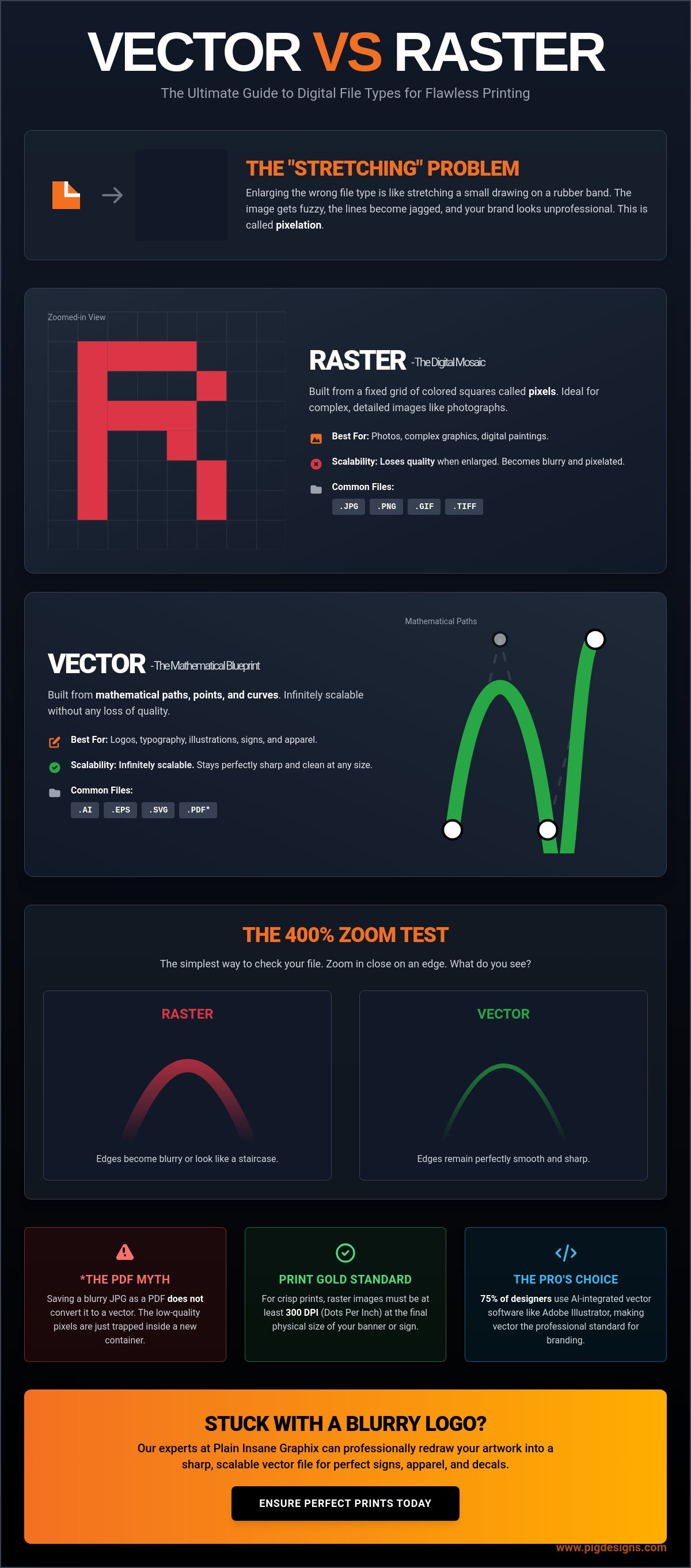
Raster files are digital mosaics. They are made of thousands, or even millions, of tiny colored squares called pixels. As of 2026, pixel-based editors still account for 32.2% of the graphic design software market because they are unbeatable for complex color blends. This is why a photo of your Hanford High School football team or a sunset over the Central Valley is always a raster file. These images capture incredible detail and subtle shadows that vectors simply can't replicate.
The catch is that rasters have a fixed size. They are built with a specific number of pixels. When you try to make a small JPEG larger, your computer has to guess where to add new colors. This results in "pixelation," where those tiny squares become visible to the naked eye. If you start with a low-resolution file, it's going to stay blurry no matter how much you try to "enhance" it.
Vector Files: The Infinite Scalers
Vector files are the blueprints of the design world. Instead of using pixels, they use mathematical equations to define points, lines, and curves. This mathematical approach is what makes Vector graphics explained as the gold standard for logos and typography. A vector file is a resolution-independent graphic; it doesn't care how big or small it is. You can take a vector logo and scale it from the size of a postage stamp to the size of a billboard without losing a single ounce of quality.
Because vectors rely on math, they provide perfectly clean edges every time. This is critical for processes like screen printing or vinyl cutting, where the machinery needs a precise path to follow. If you are sending over artwork for custom gear, a vector file ensures our team can separate the colors accurately and deliver the "Amazing Quality" we are known for in Kings County.
The Scaling Problem: Why Your Logo Looks Blurry
Imagine drawing a small smiley face on a rubber band. When the band is relaxed, the drawing looks sharp and clear. But what happens when you stretch that band to fit around a large shipping box? The ink thins out, the lines get fuzzy, and the face becomes an unrecognizable smudge. This is the exact problem people face when they try to enlarge a raster image for a large project. If you've asked yourself, is this image going to work, it's usually because a small logo that looked great on your phone suddenly looks like a mess on vinyl banners.
A common pitfall we see is when a business owner takes a profile picture from Facebook and expects it to work on a 4-foot sign. Social media platforms compress images to save space, often stripping away the data needed for high-quality printing. As of 2026, the professional standard for a sharp print remains 300 DPI (Dots Per Inch). When you "stretch" a low-resolution raster file, you aren't adding detail; you're just making the existing pixels larger and uglier. This is why being "resolution-independent" is the most important phrase in the printing world. It's the superpower that vector files have and raster files lack.
What is Pixelation?
Pixelation is the "stair-step" effect you see on jagged edges when an image is too small for its intended use. Instead of a smooth curve for your logo, you see a series of blocky, colored squares. This ruins the professional look of your brand. If your logo looks like a 1980s video game on your aluminum signs, it sends the wrong message to your customers in Hanford and Lemoore. You can check your file’s resolution by looking at the pixel dimensions in the file properties. If those numbers are small, the print will be blurry. If you're stuck with a low-res file, our team at Plain Insane Graphix can help you determine if it's salvageable or if it needs a total vector redraw.
The Math Behind the Magic
Vectors avoid the blurriness because they aren't made of static pixels. Instead, they use mathematical equations to recalculate their shape every single time they are resized. Whether you're putting a logo on a custom hat or a massive wall mural decal, the software redraws the lines perfectly. This math makes vectors the gold standard for branding. For a deeper technical dive into these differences, Adobe's guide to raster vs. vector explains how industry-standard tools like Illustrator 30.3 handle these complex paths. While a raster file is a snapshot in time, a vector is a living set of instructions that stays crisp at any size.
Choosing the Right File for Your Project
Are you ready to get your project moving? Understanding the technical side is great, but the real test happens when your file hits our production floor. If you're still asking if your logo is good enough for print, the answer usually depends on whether we are using ink, thread, or vinyl. For most of our clients in Hanford and Visalia, the goal is a professional finish that lasts. Choosing the wrong format can lead to delays or a final product that doesn't meet our "Voted Best" standards.
Best Files for Apparel and Hats
When we produce screen printed t-shirts, we have to separate your design into individual ink colors. Vector files are essential for this because they allow our software to isolate every shape with surgical precision. If you send a raster file for a three-color logo, the edges where the colors meet often look "fuzzy," making it nearly impossible to get a clean print. This same principle applies to embroidered polos for your local business. Our digitization software uses the clean lines of a vector to map out exactly where every needle drop should occur. As Platt College on vector and raster graphics points out, vectors provide the clear paths necessary for these specialized manufacturing processes. One actionable tip: always ask your original designer for the "source file," which usually ends in .AI or .EPS. Having this on hand saves you time and money.
Best Files for Signs and Banners
For custom real estate signs, crisp text is non-negotiable. You want your phone number and name to be readable from a moving car. Vectors ensure those characters stay sharp no matter the size. However, there's one notable exception where a raster is actually better. If your project includes a high-detail photograph, like a graduation sign featuring a student's portrait, you must use a high-resolution raster. A vector can't replicate the millions of subtle skin tones and shadows found in a photo. Large format printing demands higher standards than what you see on a small computer screen. While your screen might only show 72 DPI, our printers need that 300 DPI standard to ensure your full-color banners don't look "grainy" to people passing by. Knowing your image type helps you pick the right tool for the job every time.
Common File Extensions and the "PDF Myth"
Identifying the extension at the end of your filename is half the battle when figuring out what type of logo file you have on your hands. Most people in Hanford or Lemoore look for a .PDF and assume they are good to go. However, there is a massive trap here that often leads to project delays. We call it the "PDF Myth." To understand why your file might still be "unusable," you have to understand how these files are built.
Think of a PDF like a plastic storage bin. It is just a container; it only holds what you put inside. If you take a fuzzy, low-resolution photo (a raster) and put it into that bin, it doesn't magically turn into a crisp blueprint (a vector). It's still just a fuzzy photo sitting inside a PDF box. This is why our team at Plain Insane Graphix often has to ask for a "true vector" file even after a client sends a PDF. If the original art wasn't created with math and paths, the container doesn't change the quality of the contents.
The Raster Checklist
If your file ends in one of these extensions, it is built from pixels. These formats are great for your website or social media, but they have limits for physical gear like printed hoodies.
.JPG / .JPEG: The most common format for photos. It is great for detail but always has a solid background.
.PNG: Popular for the web because it supports transparent backgrounds. If this type of file is large enough it can be used for DTF apparel printing. It's still a raster though, so don't try to scale it up for a billboard.
.PSD: A Photoshop file. While powerful, it is almost always pixel-based.
.TIFF: A high-quality raster often used in professional photography.
One major warning: never just "Save As" a JPEG to make it a vector. Changing the name of the file from logo.jpg to logo.eps doesn't change the DNA of the image. It just creates a confused file that still won't print clearly. If you aren't sure if your file is ready, reach out to our team for a quick file check.
The Vector Checklist
These are the files our production team loves to see. They ensure your branding stays sharp on everything from promotional pens to vehicle decals.
.AI: A lot of the design industry uses Adobe Illustrator. This is the "gold mine" of design files.
.CDR: Another popular graphics program is CorelDRAW, not as widely used as Illistrator, but it is what we use at Plain Insane Graphix.
.EPS: A universal vector format. It works with almost every professional print software in existence.
.SVG: Scalable Vector Graphics. These are growing in popularity for web use but work perfectly for simple print logos too.
.PDF: As we discussed, this can be a vector, but only if it was exported correctly from vector software like Illustrator or CorelDRAW.
Getting Your Artwork Print-Ready in Lemoore
If you've just realized your only logo file is a tiny, blurry JPEG from an old email, don't panic. You're not the first person in Lemoore to hit this hurdle. Now that you understand the difference in file types you have the knowledge to fix the problem before it ruins your order. While some faceless online printing sites will take your money and print a pixelated mess, we do things differently here in Kings County. We want your brand to look as professional as you are.
Working with a Local Expert
Being Voted Best in Kings County means we care about how your brand looks in the real world. We don't just hit "print" and hope for the best. If your art isn't quite ready, our team can help with file conversions and redraws to ensure your printed hoodies and team jerseys look perfect.
Requesting a Quote with Confidence
When you call us from Hanford or Visalia, you can speak with confidence. Instead of saying "I have a picture," you can tell us if you have a 300 DPI raster or a true vector file. This clarity helps us give you an accurate quote and timeline right away. Our process is designed to be super easy and convenient for local business owners and school groups alike. Knowledge is the secret to a stress-free project that finishes on time. Before you send that final email, run through this quick checklist:
Check the extension: Does it end in .AI, .EPS, or .SVG?
Check the zoom: Does it stay smooth and sharp at 400% zoom?
Check the resolution: Is your raster file at the 300 DPI standard?
We take pride in helping our community stay in touch and look its best. Whether you need a single graduation sign or a fleet of vehicle decals, we are here to guide you through every step. Ready to see your brand in high-def? Get a quote from Plain Insane Graphix today!
Ready for Sharp Branding?
You now have the tools to ensure your next project looks incredible. Remember that vector files like .AI are your best friend for logos, while high-res rasters are perfect for those graduation sign photos. Don't let the "PDF Myth" slow you down. If you're still wondering, "what is the difference between a vector and raster file?" just remember that one is a blueprint and the other is a photo. Since 2003, our team has been the local Lemoore experts helping businesses and schools look their best. We've been Voted Best in Kings County because we don't just print; we provide professional art support and quick turnaround times. Whether you're in Hanford, Visalia, or right here in Lemoore, we make the process super easy and stress-free. We can't wait to see your vision come to life in high-definition quality.
Frequently Asked Questions
Can I turn a low-resolution JPEG into a high-quality vector?
You cannot simply "save as" or rename a JPEG to turn it into a vector. This process requires a professional redraw where a designer uses software like Adobe Illustrator 30.3 to trace over your original image. This creates new mathematical paths that stay sharp at any size. While 75% of designers now use AI-tracing tools as of March 2026, a human touch is still needed to ensure lines are perfectly straight for your aluminum signs.
Is a PDF always a vector file?
A PDF is not always a vector file. It acts as a digital container that can hold either raster images or vector shapes. If you put a low-quality smartphone photo inside a PDF, it stays a low-quality photo. To check yours, zoom in to 800% in your viewer. If the edges stay smooth, it is a vector. If they look like a blocky staircase, it is a raster in disguise.
Why does my logo look blurry on my Facebook page but fine on my business card?
Your logo looks different because computer screens only require 72 DPI, while high-quality printing requires 300 DPI. A file that looks "good enough" on a small smartphone screen often lacks the data needed for a physical product. Facebook also compresses your files to save server space, which further reduces quality. This contrast is a perfect example of a raster file and a vector file in action.
How do I know if my file is 300 DPI?
You can check the resolution by right-clicking your file and looking at the "Details" or "Properties" tab. Look for the dimensions in pixels. For a standard 4x6 inch print, you need at least 1200x1800 pixels to hit that 300 DPI mark. If your file is only 200x200 pixels, it will look grainy on anything larger than a postage stamp. Our team in Lemoore can quickly verify this for you.
What file should I send for custom embroidery on hats?
We prefer vector files for custom embroidery on hats. Our digitization software uses these clean lines to map out every single stitch for the embroidery machine. While we can sometimes work from a high-resolution raster, a vector ensures your thread design looks sharp and professional. This is especially important for complex designs on performance hats or structured snapbacks from brands like Richardson or FlexFit.
Can I use a screenshot for my print project?
You should never use a screenshot for a professional print project. Screenshots only capture the 72 DPI resolution of your screen, which is nearly 75% less detail than what our professional printers require. When we scale that up for a vinyl banner or a yard sign, the result is always blurry and unprofessional. It's always better to track down the original source file from your designer to ensure amazing quality.
Do I need a vector file for a photo-based banner?
You do not need a vector file for a photo-based banner. In fact, a high-resolution raster is the only way to capture the millions of colors in a photograph. When you're shopping for a graduation sign or a family reunion banner, the answer is usually a 300 DPI JPEG. Just make sure the file size is large enough to handle the final print dimensions.


Comments